

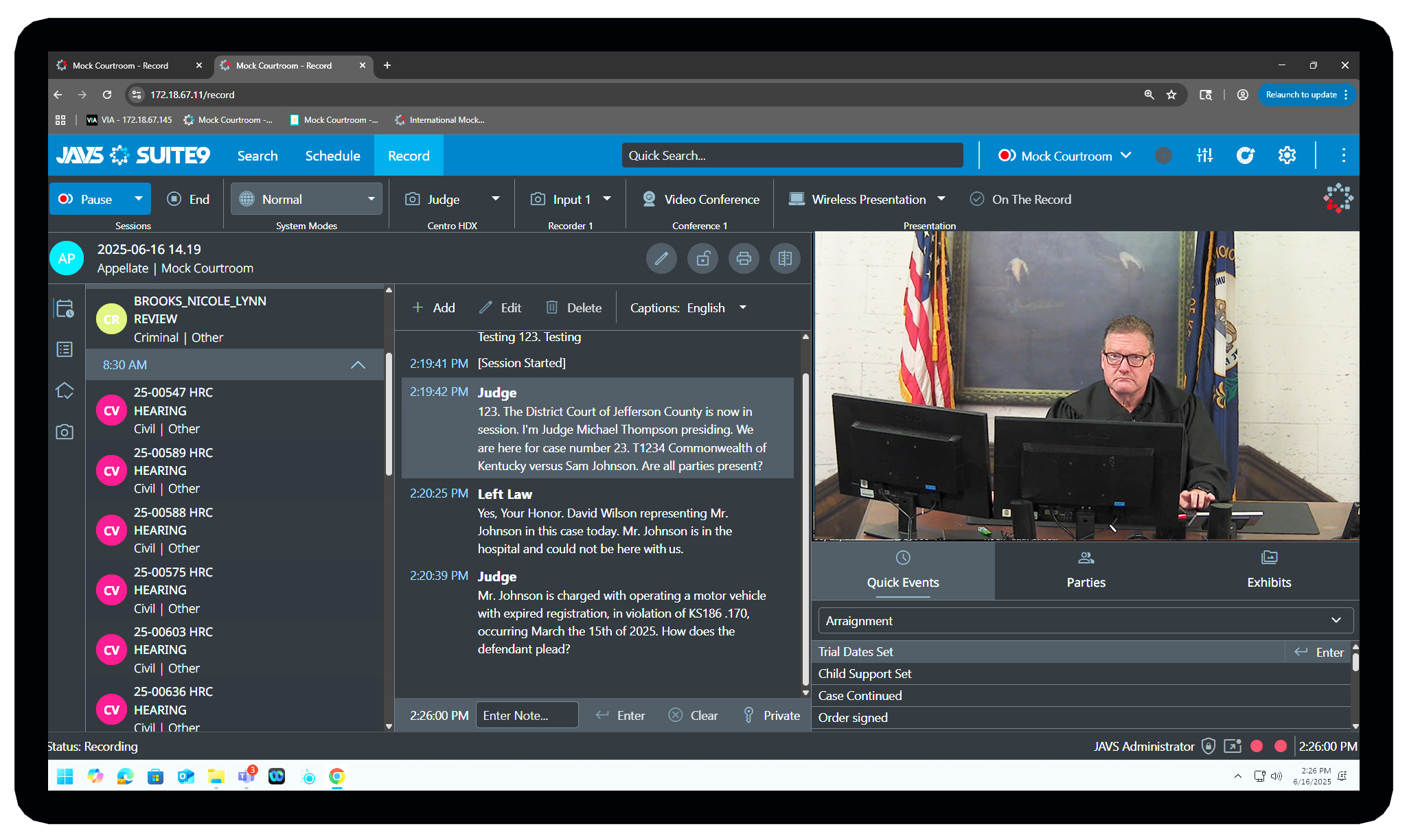
JAVS Suite 7, where the complete digital recording begins—Log, Control, Access, Publish, View
Immediate access to court proceedings and retention of business meeting content are just some of the factors driving organizations towards JAVS Suite 7.
JAVS Suite 7 software is the key to providing your organization with the tools necessary to capture, store and deliver all your business, classroom and courtroom recording needs. JAVS Suite 7 is engineered with ease of use and flexibility in mind.
AutoLog 7—Logging and Control Software
All controls for JAVS Digital Recorder 7 are within AutoLog. Users can start/stop multiple JAVS recorders with a single click. Enter or change session properties, change modes for public address and video conferencing. Users can enter real-time metadata for a complete, interactive record of proceedings. Users can customize their own event lists to streamline entry of repetitive tasks. “Seal” private sessions from non-credentialed users.
Scheduler 7—Session Preparation Software
Create new record sessions, edit session properties, reschedule sessions and copy schedules to different dates. Schedule automatic start and stop times without any user interaction. Scheduler 7 supports freeform text entry and autocomplete for repeat clients and session participants. View schedule information by order, time, week, and month.
Publisher 7—Network and removable media distribution software
Search through your content to locate and distribute recorded sessions to network locations or removable media. Users can choose to publish only public information, keeping private materials from leaving the secure system. When equipped with multiple digital recorders, users can choose their record quality, based upon available video and audio parameters.
Viewer 7—Session viewing and playback software
View sessions from disc, USB, or browse all digital recorders on a network. Event logs are displayed to allow the user to begin playback from anywhere within the timeline. Volume controls allow users to mute or unmute any system and available audio tracks at playback. Viewer 7 Pro offers footpedal controls for transcription, playback speed with pitch correction, and tools for segmenting sessions.
Minimum/Recommended Hardware Requirements
Requirements Document
HOME | ABOUT | PRODUCTS | INSTALLATIONS | SUCCESSES | SERVICE | SUPPORT | CONTACT
